ClipboardBuddy
Your clipboard, supercharged
A powerful clipboard manager for Windows that remembers everything you copy. Browse your full clipboard history, organise clips into workspaces and folders, build reusable templates with variables, automate repetitive paste sequences with macros, and protect sensitive content with AES encryption. Supports text, rich text, images, links, and code. Available free with core features or Pro for the complete suite.
Free version includes clipboard history, basic search, and pinned items. Pro adds workspaces, templates, macros, encryption, and advanced analytics.
Why Choose ClipboardBuddy
Full Clipboard History
Automatically captures everything you copy — text, images, links, code, and rich content — so nothing is ever lost
Workspaces & Folders
Organise your clips into dedicated workspaces for different projects, with nested folders, custom colours, and icons
Templates & Macros
Create reusable text templates with dynamic variables and automate multi-step paste sequences with fully customisable macros
Encryption & Privacy
Protect sensitive clipboard items with AES encryption. Automatic detection of credit cards, API keys, passwords, and other sensitive data
Choose Your Edition
Both editions include the full application — Pro unlocks advanced features
ClipboardBuddy Free
- Full clipboard history
- Basic search
- Pin & favourite items
- Auto-tagging by content type
- QR code generator
- Workspaces & folders
- Templates & macros
- AES encryption
- Advanced analytics
ClipboardBuddy Pro
- All Free features plus:
- Workspaces & nested folders
- Templates with variable substitution
- Multi-step clipboard macros
- AES encryption per item
- Sensitive data detection
- Advanced analytics & timeline
- Priority email support
Features
Everything you need to take control of your clipboard
Clipboard History
- Text, images, links, code & rich text
- Pin & favourite items for quick access
- Usage count & last used tracking
- Source application tracking
- Duplicate detection via content hash
- Per-item expiration dates
Organisation
- Multiple workspaces per project
- Nested folders with colours & icons
- Auto-tagging (Email, URL, Phone, Code, JSON, SQL)
- Timeline / time machine browser
- Activity heatmap & hourly distribution
Templates & Macros
- Text templates with variable substitution
- Reusable saved template variables
- Multi-step clipboard macros
- Global hotkey triggers for macros
- 10 customisable quick-paste slots
- Assign items, templates or macros to slots
Security & Tools
- AES encryption per clipboard item
- Sensitive data detection (cards, API keys, JWTs)
- Text formatting (case, Base64, URL encode)
- JSON & XML formatter / validator
- QR code generator for any clip
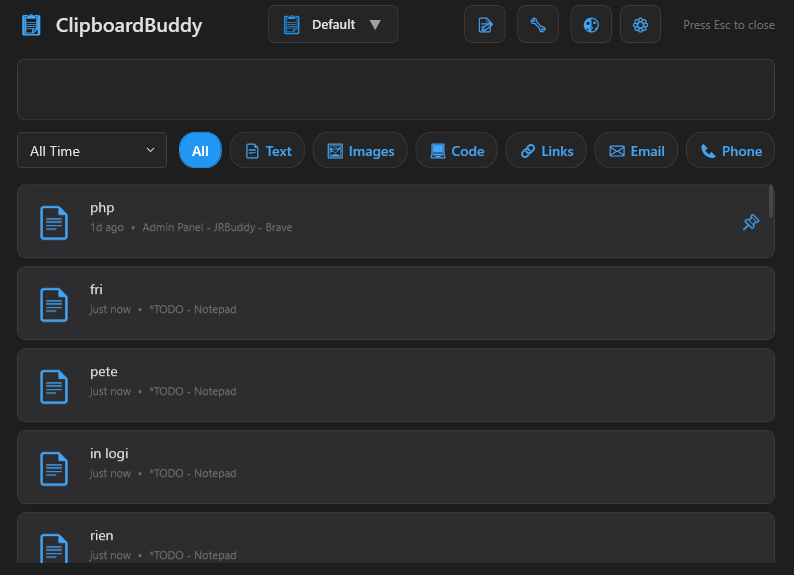
ClipboardBuddy Screenshots
See ClipboardBuddy in action
1
Main Interface
Full clipboard history with search and filtering
 2
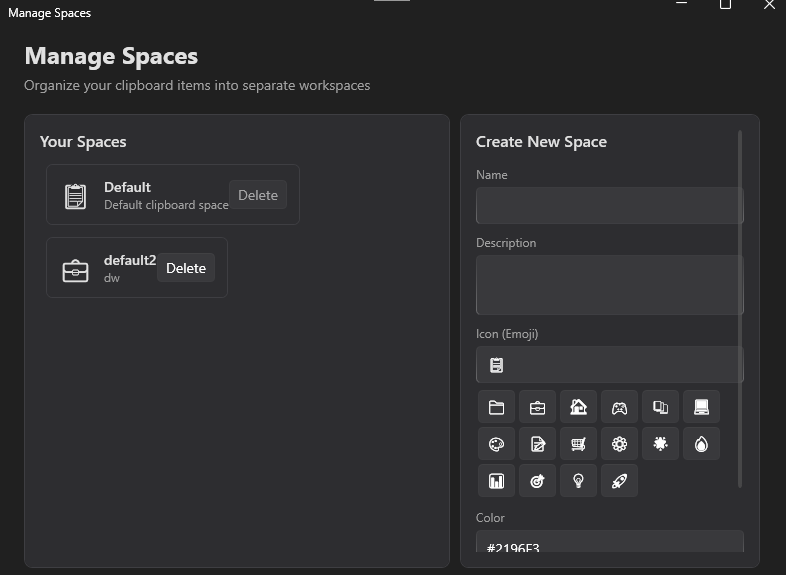
2
Spaces & Workspaces
Organise clips into dedicated workspaces and folders
 3
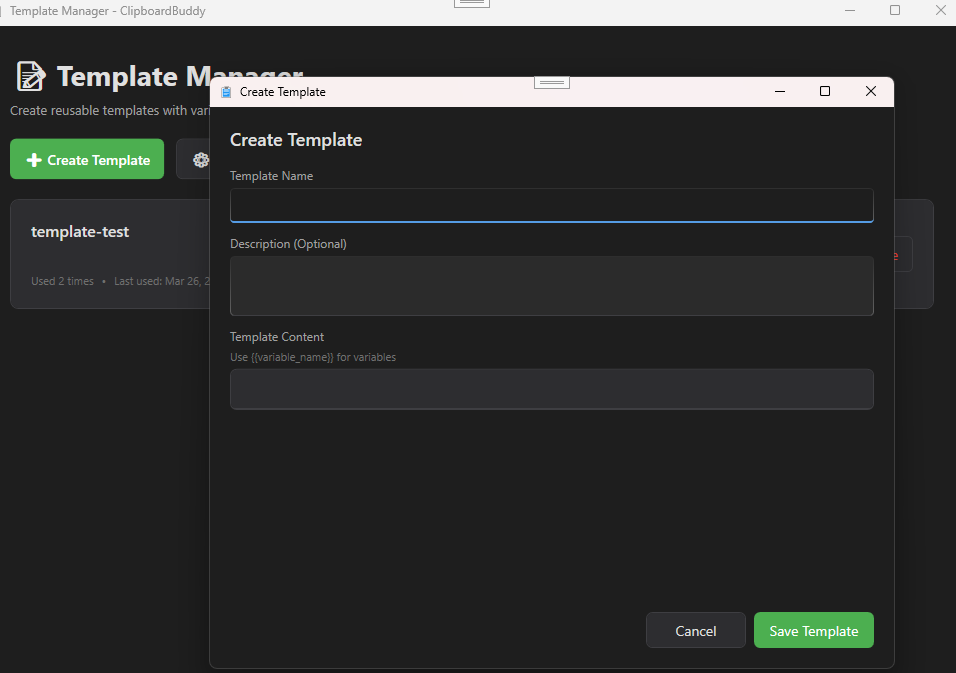
3
Templates
Reusable text templates with dynamic variable support
 4
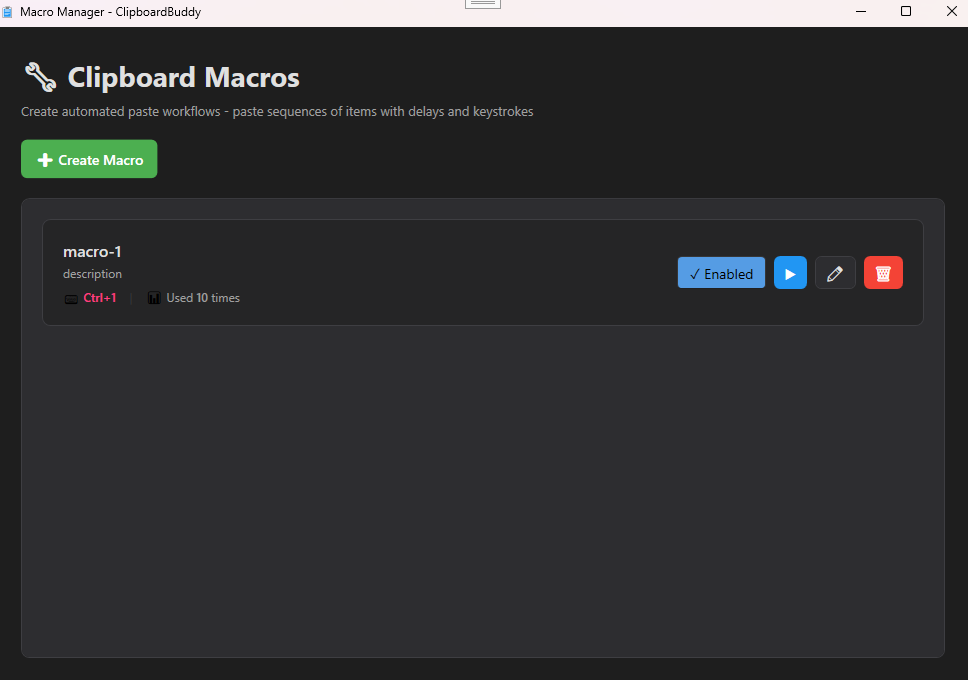
4
Macros
Automate repetitive paste sequences with hotkey triggers
System Requirements
Frequently Asked Questions
Yes, ClipboardBuddy is free to download and use for clipboard history, basic search, and pinned items. Pro unlocks workspaces, templates, macros, AES encryption, image editing, advanced analytics, and priority support.
All clipboard data is stored locally on your device using a SQLite database. Nothing is uploaded to any server. Your clipboard history never leaves your machine.
Macros are sequences of steps — paste a saved item, type specific text, send a key press, or add a delay — that execute in order when triggered. You can assign a global hotkey to any macro so it runs instantly from any application.
ClipboardBuddy automatically scans new clipboard items for patterns like credit card numbers, API keys, JWT tokens, AWS secret keys, and passwords. Detected items are flagged so you can choose to encrypt or delete them.
ClipboardBuddy can store an unlimited number of items. You can configure a retention period and history limit in settings to automatically clean up older entries and keep storage usage in check.
Get ClipboardBuddy Today
Stop losing what you copy — let ClipboardBuddy remember everything